Posts from Rob Meek (meek)
Server Problems Fixed
First up, sorry for the unheralded downtime last Thursday and Friday. With well over a 100,000 registered FontStructors and a similar number of FontStructions in the system, our server decided it needed a few hours of tender love and care from our sysadmins. Apologies to all whose bricklaying was interrupted.
Scrollable Character Selector
The FontStruct team has been a bit quiet for a while but don’t worry, we continue to make improvements to FontStruct, and are preparing many more. One recent change in the FontStructor is that the character set selector is now scrollable. This means that people with smaller screens can now easily skip between Tamil and Basic Latin. The old selector with its tendency to disappear off the edge of the screen annoyed and puzzled many, so we’re very glad to have that finally sorted.
Large FontStructions and Saving strategies
One of the ongoing challenges the development team has to deal with is the unforeseen ambition and scale of some FontStruction projects. Some designs contain so many bricks and so many characters that parts of the FontStruct system struggle to keep up. For example, some users have had problems saving because so much information needs to be sent to the server. I’ve written a little FAQ article about this problem. We will continue to try and optimize the saving process, but if you’re working on a very large FontStruction, often the best strategy is simply to split your creation into two or more parts. An excellent example of this strategy is the masterly Prometheus Shadow Basic and Extended set from SquarePeg. The FontStruction is built on a high resolution matrix and contains 388 glyphs. It needed to be split not only to get around saving problems, but also to make downloading as a TrueType font possible.

Optimized Gallery Previews and Illustrated RSS feeds
Another issue with large FontStructions has been the relatively long load-times for previews in the Gallery. We put some new code online today which speeds things up a lot. A nice side-effect of this work is that the RSS news feeds from the gallery now also contain images, just like Flickr photostream feeds.
The Joy of FontStruct
Of course aside from technical improvements, excitement and novelty is always to be found at FontStruct in the boundless ingenuity of the FontStruct community. It’s wonderful to see the ever-expanding range of complex, beautiful and funny designs being built within the limits imposed by the application. Thank you, and carry on FontStructing!
We’ve released an updated version of the FontStructor. Clear your browser caches, reload and enjoy. Here’s a quick rundown on the new features:
New “Current Letter” Window
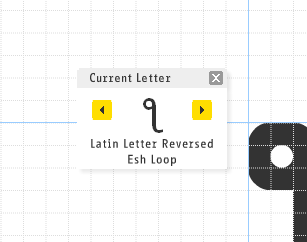
There’s a new window in the interface titled “Current Letter”. This contains an example character for the letter you are currently editing and underneath, the name of this character. The universally-despised, floaty, sticky “Next Letter” and “Previous Letter” buttons are now more sensibly integrated into this new, moveable window.
Rollover examples in the Character Selector bar

Rolling over any character in the Character Selector bar will now give you a larger tooltip containing a larger example character and the character name.
Better and wider range of Fonts used in the Character Selector bar
Many of you have noticed that many characters have not been displayed properly in the Character Selector bar. Slots have either been empty or the “null” glyph, a placeholder has been displayed. This has been especially problematic for non-latin characters.
It’s difficult to solve this problem completely because the FontStructor uses the fonts installed on your system to display these characters, and these fonts vary greatly, but we have made some changes which should improve matters. People using OSX and Windows should notice an improvement immediately. Coverage should improve further if users (on any platform) download and install the public domain fonts DejaVu Sans, and/or the very extensive GNU Unifont.
Expert Info

If you choose “Expert Info” from the “View” submenu under “Advanced” you will see the unicode codepoint values for the relevant character, both in the Current Letter Palette and when rolling-over letters in the Character Selector bar. If we add any further such expert features they will probably also be toggled on and off using this option.
Optimized Saving
Saving should now be noticeably faster, in particular for FontStructions which use many bricks or have many characters.

Just a quick note about ways of contributing to, and keeping abreast of current discussions and changes at FontStruct.
For RSS junkies there is a plethora of different feeds available. (If you don’t know what RSS is, take a look at this BBC page).
We haven’t actually put any extra RSS buttons on the relevant pages, so just use whatever standard mechanism your browser provides to subscribe. In Firefox for example, you’ll always see the orange RSS icon in the location bar when a feed is available. Click on it to subscribe.
So first of all there is a pooled RSS feed for all comments. Subscribe to this feed and you can keep up with what’s being said about all FontStructions. I like the empty entries in this feed — that usually means someone has uploaded some Artwork.
Secondly, there is a feed for every gallery page. Just set up the gallery the way you want and then subscribe. You can subscribe to a general feed like What’s New to see the latest Top Picks, or you can follow a particular category like Script FontStructions, or even track developments for a specific search term like “Western”.
If you’re particularly interested in one FontStruction or the discussion about it, every FontStruction also has it’s very own RSS feed. Just go to the respective FontStruction’s home page and subscribe.
Last but not least there is of course the feed for this blog.
Other than commenting on FontStructions, there are two places where you can participate in discussion on FontStruct. Commenting on blog posts like this one is one option, and there is also the FontStruct Flickr group. So far, people have used the Flickr group exclusively for sharing artwork made with, or related to FontStruct, but there’s also a fully fledged Discussion forum.
We’ve made a couple of improvements to the “Font Mortar” which is the software which glues your bricks together and generates the TrueType fonts on FontStruct. These are the first of a number of planned changes to the font generating features.
The first change effects the height of the fonts. A lot of people have noticed that FontStructions often have to be set at crazily large point sizes to be legible. This should no longer be the case with fresh downloads. Also the FontStruct icon which is used as the “empty glyph” in every FontStruction is now scaled properly so it doesn’t dwarf other characters.
The second change deals with word spacing. Early on, FontStructors discovered that if you built letters starting one or two bricks to the left of the “LEFT” line, you could get around the automated one-brick-spacing between letters. Until now this trick only worked on the FontStruct website. Now it works for downloaded FontStructions too. So classics like Marshmallow Script, Ice Box or Epiorque Joined should now work as expected without any need for manual spacing. Support for adjusting word spacing in a more intuitive manner is on its way.
One side effect of these improvements is that most fonts downloaded from now on will have slightly different vertical metrics (heights and linespacing) and possibly different horizontal metrics (word spacing). So if you have used FontStructions in any existing artwork, you may want to make a copy of your old download before you grab an updated version.
We added some new Bricks to the FontStructor today: elongated right-angled triangles, and isosceles triangles. These should provide some more options for building diagonals.

You’ll find the new bricks at the bottom of the “All Bricks” panel. Thanks to Diego Sans Salas for spelling out why these will be useful.
Update:
Due to popular demand we’ve added some more bricks to represent all permutations for the elongated triangle shape:

Two members of the FontStruct team, Stephen Coles and myself, will be talking about FontStruct at this year’s TYPO Berlin conference. TYPO is in the “Haus der Kulturen der Welt” in Berlin, Germany. Our talk is on Thursday, 29th May at 5p.m. There’s more information on the event and location on the TYPO website.
Conference registration is sold out, but we’re on a stage in an area with free public access, so if you’re in the neighborhood, please stop by, especially if you have any questions or suggestions for the FontStruct team.
Read more about the FontStruct presentation here.

FontStruct hasn’t yet been formally announced, but it’s fully functional and open to all while we fiddle under the hood. The easiest way to get started with the FontStructor is to check out the quick start guide. Enjoy yourselves, and please let us know if you have problems or suggestions while we’re in this beta phase.


