


New Features: Favorites and improved Tagging
News | Rob Meek (meek) | February 12th, 2010
Sunday is Valentine’s day. Time to finally declare your love to that special someone dearest to your heart. But why wait two days? With the new “Favorites” feature on FontStruct, you can now easily start right now, sharing your affection for the work of fellow FontStructors.
Favorites, along with an improved and extended tagging system, are a core feature of today’s site update, which we think will really help you to organize and access your own work, and that of other designers, more easily.
People have been asking for these new features since the early days of FontStruct, and as the gallery has sprawled over countless pages, and individual FontStructors have found themselves working on hundreds of designs, there’s been an obvious need for new ways to organize and navigate through work on the site.
Favorites
You can now bookmark any shared FontStruction (other than your own) by clicking on the “Add Fave” icons which you can see all over the site.

All of your Favorites can be browsed on your My FontStruct page under the “Favorites” tab:
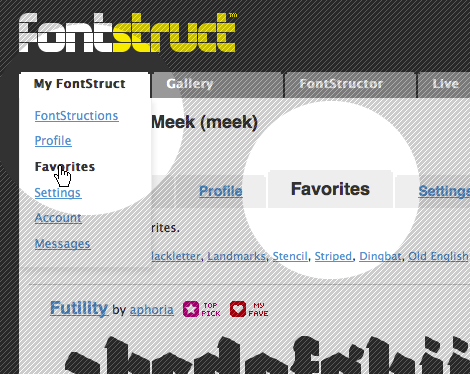
You can also browse other people’s favorites when you visit their FontStruct homepages.
Favorites can be used to collect and organize any FontStructions which you find interesting, or to collect designs for specific projects and purposes. Favorites will also function as a new way of sorting FontStructions in the gallery – with a new “Favorite Count” sort order. Next to every FontStruction in the gallery you will see a heart icon, indicating the number of users who have “Favoritized” that design.
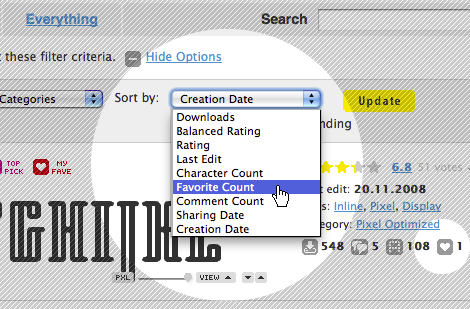
Not all love is eternal of course. Just click on the Favorite icon again to drop a favorite:

Tagging Favorites
You can now also tag other people’s work by tagging your Favorites. You can do this either on the respective FontStruction homepages, or on your Favorites pages under MyFontStruct:
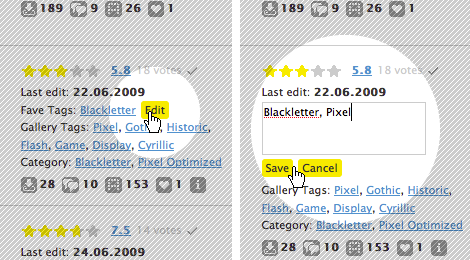
At the top of your Favorites pages you can access and browse all of your favorite tags.
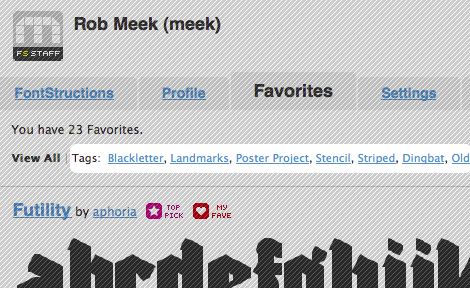
You can use these Favorite Tags to collect and group, for example, your favorite FontStruct pixel fonts, or your favorite western-style fonts, whatever you like. Or, if you’re interested in using a FontStruction for a specific project, you can use a favorite tag to collect some candidates:
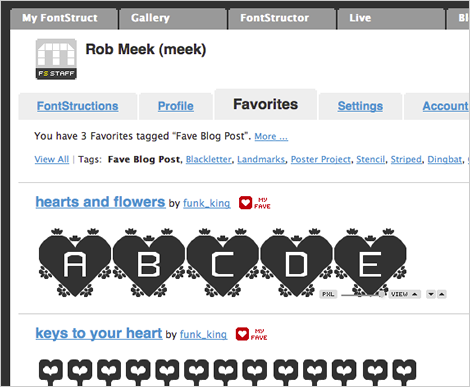
Enhanced tagging of your own work
As well as adding Favorites and the ability to tag them, we’ve enhanced the way that existing gallery tags work. Gallery tags are the tags which FontStructors apply to their own designs and which have always been visible on the gallery pages.
Designers going to their MyFontStruct page will now see an overview of all of their gallery tags at the top of their FontStruction listings:

If you click on any tag on your My FontStruct > FontStructions pages you will see only the work which you have tagged in this way. For those of you with hundreds of designs this should make it a lot easier to organize and navigate through them. Other users visiting your user homepage will also be able to use these user-specific tags to browse your work. If you click on the “View all FontStructions tagged with …” link you will be taken to the gallery and see all work tagged with the same tag.
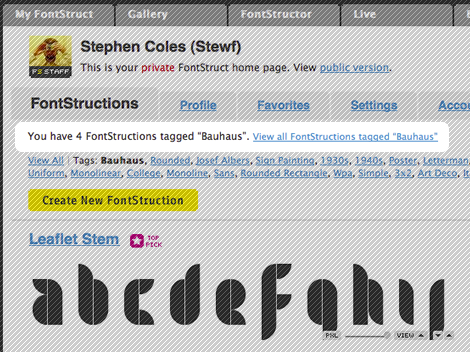
You can use tags to organize your work into families of related fonts accessible via a single, unique and human-friendly URL such as “http://fontstruct.com/fontstructors/funk_king/tags/Track”

As with Favorites, you don’t need to go to the individual FontStruction page in order to add tags, you can now tag your work directly in your MyFontStruct > FontStruction listing pages.
Private Tagging
Your Favorites and your Favorite Tags are all visible to all FontStruct users. Tags which you apply to your own work are also visible to others with one exception: Any tags applied by you only to your own private FontStructions will also be visible only to you. So private tagging of your own private work is possible.
Known Issues
When trying out the feature we noticed that some FontStructors had already used a huge number of tags.The truly inimitable funk_king for example has almost 1000 tags already. This is wonderful, but it also means we will have to add some way of navigating through such very long lists of tags. Until then, you can create as many tags as you want but only the first 1024 will be appear at the top of your MyFontStruct/FontStructions pages. The tags are sorted according to how often they have been applied, so the most common tags should appear first.
Adieu Pink Dot
The most important and controversial change of all today! The old magenta “TOP PICK” sticker has been retired to a comfortable folder far away, to make way for a new star icon. The old girl had been through a lot, and deserves a rest from her many brick-bearing suitors. The new TOP PICK star is a bit more compact and should work better together with other icons such as the new favorite icons and future additions.
Other Changes
There are a number of other, smaller changes across the site:
There is now a comment form at the bottom of longer comment threads, so you don’t need to scroll back to the top of the thread if you want to say something.
Tag links in the gallery are now shorter, taking the form /gallery/tag/mytag, and clicking on them will really only show you FontStructions which have been tagged accordingly. (Until now clicking on a tag did a a search of tags, FontStruction names, designers, and FontStruction descriptions, which was slow and could produce confusing results).
There is a new category – “monospaced” which will show you all shared, monospaced FontStructions.
As always little bugs may appear when changes are made, so let us know in the comments or contact us if you notice anything wierd.
Enjoy!
Looks great. Can’t wait to try out the new features.
– Bob Wertz — February 12, 2010 #
oh well, bad guesses, but great enhancements! didn’t know i had so many tags :) i’m tagged-out :( faves feature is sweet. thanks, meek.
– funk_king — February 12, 2010 #
I liked your guesses. Without making any promises, I’d really like the next feature release to be about the FontStructor.
– Rob Meek (meek) — February 12, 2010 #
Great improvements!
I´m going to need some time to put my favorites in order. There are so many of them…
Thanks for giving me a busy weekend :)
– cayo — February 12, 2010 #
Looks like I did make a change to the FontStructor – It was broken by the update. Should be working normally again now.
– Rob Meek (meek) — February 13, 2010 #
Great changes – navigating by tag should make life a lot easier. Faves looks interesting and the lower Comments form is an excellent idea.
You were obviously well advanced with the Tags process when I mentioned my idea about a list. Great minds think alike … and as my old Scottish Mum always adds “… little ones seldom differ.” :)
– p2pnut — February 13, 2010 #
I’m glad FontStruct is continuously evolving.
Tags are great to organize things.
Yet the fact that also in your private lab tags are sorted according to how often they have been applied and not alphabetically, makes hard to find fonts tagged with a specific tag.
– Em — February 22, 2010 #
Thanks for the feedback Emilio. Point taken. A little autocompleting search box (to look for tags and FontStruction names) would be nice too – something for the future. Other thoughts on the default sort order of tags in the private view are very welcome.
– Rob Meek (meek) — February 23, 2010 #